
Thanks to large expansion of computer appliance in all industry, there is a huge amount increase and variety of application software equipment. Basically it is a spontaneous process, witch very often gives out a corruption of basic ergonomic rules of an application production. There is several ways how to define ergonomic, because it is an interdisciplinary science discipline, using knowledge of many humanity, especially medicine and technical science.
1. Formulation of the problem
Fundamental of ergonomics (ergon = work and nomos = low) is an exploration of relationship between human and operating tool (machine) or expansion environment in order to humanize technique. To establish a harmony between technical solution, product functionality and their adaptation to human limits and needs is not self – purposed. Additions are documentary, as enjoyable work in human – friendly environment on fool – proof machines, or documentary increase of production effort, decrease of faults and increase of receptivity and ability of easy absorption of know- how. The best way, how to fulfill user needs is fine understanding of problem and man point of view. In general, to keep ergonomic principles comes to decrease of human load in production process, caused its interaction with operating tools and working environment, and therefore could bring within useful application of information:
For organization
- decrease absence and illness caused its profession
- increase productivity effort
- decrease error rate
- improve psychical level of worker
For worker
- improve psychical and physical level of worker
- minimalization of symptoms of psychical and physical tired
- addition in social area
- improve self – realization with positive influence on economical situation of man and family
These rules are valid all the same in construction and design of physical components of devices and machines, and in development of software applications. It is necessary to meet them, especially in development of didactic software used for learning and to absorb new information. In nowadays world exists and operates several organizations deal with making of such as rules (IEC, SIGHI). Different situation is in our country, it does not exist any binding rule controlling design and development such as software product.
Main aspects, which has to influence on enjoyable, effective and tedious work with applications is possible to resume to two main categories:
- technical execution of application
- visual aspect of application
2. Technical execution
Is a complex of program parameters, best characterized as “system stability” and “usability”. Stability depends mainly on original conceptual program design, on used appropriate develop environment for programming the application, and on definite input and output queries for final application. Eventual later change is very difficult and severe. For example precise made icons and transparent menu will not save a product, which is inoperable and which doesn’t serve to its purpose. Developed program has to be user friendly such as transparent pull-down menu, easy accessible often-used functions, and it would keep structure of operating system control (e.g. identical short keys – F1, CTRL+C, etc.). To familiarize the application it is necessary to ensure, that the user don’t need first to learn structure of control buttons, which are natural only for developed application.
2.1 Ergonomics of visualization the application
Visual aspect of the application is what takes the first interest eventually pours cold water on user in familiarize the application. This process could be resumed into few main points:
- color of components on display
- usability control items and buttons
- readability and size of the texts
- eventually of individual actions of the application
Properly chosen color solution of workspace and software in general, helps to psychical comfort of the worker and his better work effort and achievement.
For concrete work place meets concrete rules:
- for computer work places, where high level concentrate attention is necessary (such as billing, programming, difficult work…) it is recommended selection of light tone blue and green
- for common work on computer is applicable more warmer colors
- for work place with monotonous character of work (typical inputting information into computer), is recommended to use warm colors (pastel tone cream brown, orange)
(direction of Concil of the EU num.: 90/270/EEC)
2.2 Colors on display
In use of colored displays is recommended to avoid black background, which is in edge contrast with paper basement and with computer components of workplace, which are mostly light pastel toned colors. In addition, there are visible all light reflections seen on black color basement. Maximum number of used colors in application is 4, in extreme case 6, other way dispersion and worse concentration of user menaces.
3. Efficiency of control items and buttons
 Buttons, if possible, must definite appoints function, which are assigned onto (by icon, pictogram or brief label). Here can be lucrative use of simply animated icons with expressed function.
Using 3D control items meets rule, that 2D environment is more readable and controllable as 3D, in general. Use of 3D viewing (e.g. in pull down menu) causes lost of interest and overview of user.
3.1 Text and symbols readability on display
In designing of an application, where user must work with higher number of text information (text editors, education software) installed on operating system Windows is recommended black text wrote on white basement, which are best readable in such conditions.
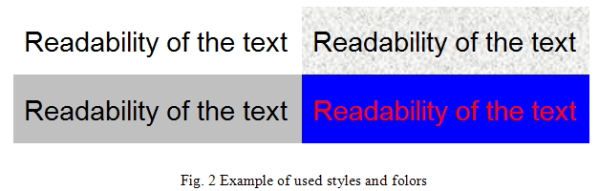
Beware of effect color combinations (e.g. red and blue or green). It endurances eyesight.
Text size would be selected appropriate to provide needed information along in good readable form. It is good to beware use of non-standard fonts, which application must install to operating system.
4. Sound in applications
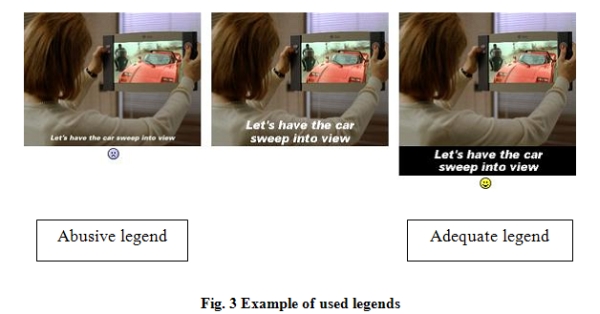
As multimedia applications are coming into spotlight, tendencies add a sound to displayed text and animation became huger. Usually it is speech, music and also sound effects, used to enhance user interface on information about incidents on background of an application (e.g. receive new mail, fault etc.). Similar rules are valid, as in common communication.
Speech would not be too fast, should be clear and loud. It is possible to use it on separate purpose – to chat a text, to drill pronunciation etc.
Music is usually used to finalize application look and behavior. It is necessary to chose good compromise between quality reproduction and system effort, to avoid unwanted time respond of the system.
Additional sound effects should give first of all discreet information about incidents. As a good example may serve a sound of letter, in coming mail.
Is important to include a possibility to turn of these sounds, or possibility to setup its volume level.
TEXT/ PHOTO: Nikola Abo Issa (Damascus University, Syria), Igor Halenár (Slovak University of Technology Trnava, Slovakia)